Open Source Invoicing Software and E-Invoicing in 2026
Yes, you can keep using open source invoicing software after the reform. It does, however, have to work through a platform approved by the French tax authority, because that platform is what sends and receives e-invoices. Since September 1, 2026, every VAT-registered business must be able to receive electronic invoices. The obligation to issue them arrives on September 1, 2027 for SMEs and micro-businesses.
Key takeaways:
- Since September 1, 2026, VAT-registered businesses must use an approved platform to receive their electronic invoices.
- SMEs, very small businesses and micro-businesses must also issue their invoices in electronic format from September 1, 2027.
- Open source invoicing software, even self-hosted, remains a “compatible solution”: it doesn't replace the approved platform and must connect to one.
- Dolibarr's EInvoicing module is still experimental. It recommends Dolibarr 24 or later and the CII format, and connects to approved platforms such as SuperPDP.
- Invoices are accounting records that must be kept for 10 years from the end of the financial year, so plan storage and backups accordingly.
Table of Contents
- What has changed with e-invoicing since September 1, 2026?
- Is open source invoicing software enough to be compliant?
- What is an approved platform and where can you find the official list?
- Is Dolibarr ready for e-invoicing?
- How do you connect open source software to an approved platform?
- What new mandatory information must appear on your invoices?
- How long should you keep invoices and where should you store them?
- Self-hosted or SaaS: which model suits a freelancer or a very small business?
- Yundera: a private server to host your business tools
- E-invoicing and open source: the most common mistakes
- Sources
- Frequently Asked Questions
What has changed with e-invoicing since September 1, 2026?
Since September 1, 2026, every VAT-registered business must be able to receive electronic invoices. Receiving them must go through a platform approved by the French tax authority. According to impots.gouv.fr, VAT-registered businesses must use an approved platform “from September 1, 2026”. This applies both to exchanging invoices and to sending transaction and payment data to the tax authority (e-reporting). These obligations come into force in two stages.
- September 1, 2026, receiving for everyone: every VAT-registered business must be able to receive electronic invoices. Very small businesses, independent professionals and micro-businesses are all affected, whatever their size.
- September 1, 2026, issuing for the largest companies: large companies and mid-sized companies (ETIs) must issue their invoices in electronic format and start e-reporting.
- September 1, 2027, issuing for everyone else: according to Entreprendre.Service-Public, the obligation “will extend to SMEs and micro-businesses from September 1, 2027”.
A PDF sent by email is therefore no longer enough. A small business can still issue invoices the way it always has until 2027. However, it already needs an approved platform to receive invoices from its suppliers, especially large companies that now invoice electronically.
Pro tip: don't treat 2026 and 2027 as two separate projects. The approved platform you choose today for receiving invoices will also be used for issuing them in 2027. Check now that it can connect to your invoicing software.
Is open source invoicing software enough to be compliant?
No. Open source invoicing software isn't enough on its own, even if it runs on your own server: it has to be connected to an approved platform. The rule is clearly stated on impots.gouv.fr: “Only an approved platform is authorized to provide all the functions required by the reform”. The same page specifies that a business “may continue to use the services of a compatible solution”. However, an operator that isn't registered “will not have the status of an approved platform”.
The reform therefore distinguishes two complementary roles:
- The compatible solution: this is your invoicing software, open source or not. It's used to create quotes and invoices, track payments, manage customers and prepare files in the right format.
- The approved platform: registered by the authorities, it receives and transmits electronic invoices and sends data to the tax authority. It can also convert an invoice into a format that suits your customer.
In practice, self-hosted open source software remains perfectly usable. You stay in control of your invoicing data and your tool, while the approved platform handles the regulatory transmission. For example, Dolibarr's EInvoicing module is designed to generate electronic invoices and send or retrieve them through an approved platform, not to replace it.
Pro tip: before choosing software, look at the list of approved platforms it can connect to. An excellent tool without a connector will force you to enter the same invoices twice.
What is an approved platform and where can you find the official list?
An approved platform is an operator registered by the French tax authority to exchange electronic invoices between businesses and transmit data to the authorities. The official list is available in the Professional Area of impots.gouv.fr. The DGFiP published it on January 16, 2026, then updated it on February 5, 2026. It describes these platforms as “the essential intermediary in the exchange of invoices”. You'll also see them referred to by their former name, PDP (plateformes de dématérialisation partenaires, or partner dematerialization platforms).
What approval actually covers:
- Prior testing: listed platforms have met the regulatory requirements and passed technical and interoperability tests. The DGFiP has also granted them a dedicated logo.
- Time-limited registration: according to impots.gouv.fr, it is granted for three years and is renewable.
- Oversight by the authorities: the registration service can impose financial penalties and withdraw registration in the event of repeated breaches.
- Format conversion: the platform can convert an invoice into a format that suits your customer, even if they use different software from yours.
For anyone using open source software, the approved platform is the mandatory gateway between the invoicing tool and the national exchange network. Choose it carefully: it will handle all your incoming invoices and, from 2027, your outgoing ones too.
Pro tip: before signing, check for yourself that the provider appears on the official list on impots.gouv.fr. A logo on a sales website or a “compatible” label doesn't prove approval.
Is Dolibarr ready for e-invoicing?
Dolibarr is partly ready: its EInvoicing module generates electronic invoices and sends them through approved platforms, but it is still classed as “experimental”. Dolibarr is an open source ERP and CRM developed since 2003. It covers quotes (Proposals) and invoicing with payment tracking (Billing & Payments), among other things, which makes it a common choice for independent professionals and very small businesses.
According to the official Dolibarr wiki, the EInvoicing module (formerly PDPConnectFR) works as follows:
- Function: it generates electronic invoices and connects to approved platforms to send them and retrieve incoming invoices.
- Supported platforms: SuperPDP and EsaLink. Access to EsaLink must go through a distributor member of PDP Libre.
- CII format: available from Dolibarr 18, with version 24 recommended. This is the format the wiki strongly advises using.
- Factur-X format: available only from Dolibarr 24.
- UBL format: not yet supported, but it could be added through community contributions.
- Status: “Experimental”. The page was last updated on October 8, 2026.
For a small business, this means Dolibarr can serve as a compatible solution, provided you upgrade to a recent version and subscribe to one of the supported platforms. The experimental status calls for caution: check how the module behaves on your own use cases before trusting it with all your invoicing.
Pro tip: test the module on a copy of your instance before touching production. Send and receive a few real invoices, then check the result on the platform side: required information, amounts, status.
How do you connect open source software to an approved platform?
To connect open source software to an approved platform, you need a contract with the platform, an up-to-date connector in the software, and a testing phase before going live. Here's the four-step method, using Dolibarr as an example:
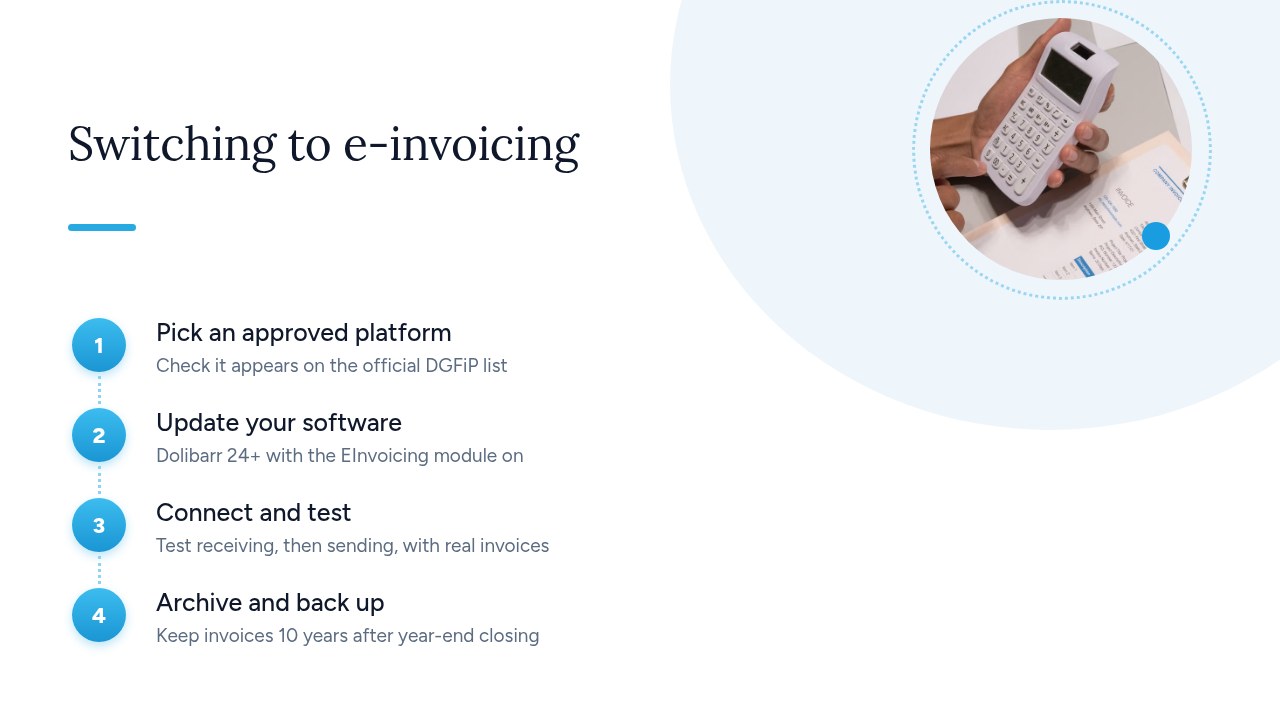
- Choose an approved platform: start with the platforms your software already supports. For Dolibarr, the EInvoicing module currently connects to SuperPDP and EsaLink. Then check that the platform appears on the official list on impots.gouv.fr.
- Update the software: back up the database, then upgrade to Dolibarr 24 or later, the version recommended by the wiki. Next, enable the EInvoicing module and preferably choose the CII format.
- Configure and test: enter the connection settings provided by the platform into the module. Test receiving first, which has been mandatory since September 2026, then issuing with a few real invoices. Check the result on the platform side.
- Archive and back up: invoices remain accounting records that must be kept for 10 years from the end of the financial year. Schedule regular backups of the database and the generated files.
Even with perfectly up-to-date software, a contract with an approved platform is still essential. As impots.gouv.fr points out, only an approved platform provides all the functions required by the reform. The software prepares the invoices; the platform transmits them.
Pro tip: keep an internal note of your Dolibarr version, the module version, the chosen format and the platform you use. During an update or an incident, this simple memo will save you hours.
What new mandatory information must appear on your invoices?
With the rollout of e-invoicing, four new items are added to the information that already had to appear on your invoices. The official Mandatory information on an invoice page from Entreprendre.Service-Public, checked on August 11, 2026, details them:
- The customer's SIREN number: mandatory when the customer is a business. It identifies the invoice recipient unambiguously.
- The delivery address: only required if it differs from the customer's address, for example for a worksite or another establishment.
- The nature of the transactions: state whether they are deliveries of goods, provisions of services, or both.
- The option to pay VAT on debits: this is only required if you have chosen this option, which mainly concerns certain service providers.
This information isn't just a formality. An electronic invoice is a structured file, read automatically by approved platforms and by your customer's software. A missing or incorrectly filled field can therefore block processing or cause a rejection, whereas an incomplete PDF often went unnoticed.
In open source software, this information depends on two things: the fields available in the customer record and the invoice template you use. Make sure the SIREN number is filled in for every business customer, and that your template shows the delivery address and the nature of the transactions.
Pro tip: use the migration as an opportunity to clean up your customer file. Fill in missing SIREN numbers before issuing your first electronic invoices, rather than fixing invoices one by one when you send them.
How long should you keep invoices and where should you store them?
Keep your invoices, both customer and supplier, for 10 years from the end of the financial year. They are among the accounting records covered by Article L123-22 of the French Commercial Code. The How long must businesses keep their documents? page from Entreprendre.Service-Public distinguishes two periods that shouldn't be confused:
- Accounting period, 10 years: this applies to supporting documents (purchase orders, delivery notes, invoices) and runs from the end of the financial year.
- Tax period, 6 years: this is the period during which the authorities can carry out audits (Book of Tax Procedures, Article L102 B). It increases to 10 years in the case of concealed activity, such as tax fraud or undeclared work.
In practice, go with the longer period: 10 years. With self-hosted software, it's up to you to guarantee that duration. An invoice issued today must still be readable and retrievable in ten years' time, after several software updates and perhaps a change of tool. Three things matter:
- Durable storage: the database and the generated files (PDF, CII or Factur-X) must stay on reliable storage that you control.
- Readable exports: regularly export your invoices in open formats that can be viewed without the original software.
- Regular backups: apply the 3-2-1 rule: three copies, on two different types of media, one of them off-site.
Pro tip: once a year, restore an old invoice from your backups. A backup that has never been tested doesn't guarantee you'll be able to produce the document during an audit.
Self-hosted or SaaS: which model suits a freelancer or a very small business?
The choice mainly depends on your skills and how much control you need. SaaS software suits those who want to get started quickly without managing anything. Self-hosted open source software suits those who want to keep their data and be free to switch tools. Either way, the rule is the same: invoices are transmitted through an approved platform, whether the software is online or installed on your own infrastructure.
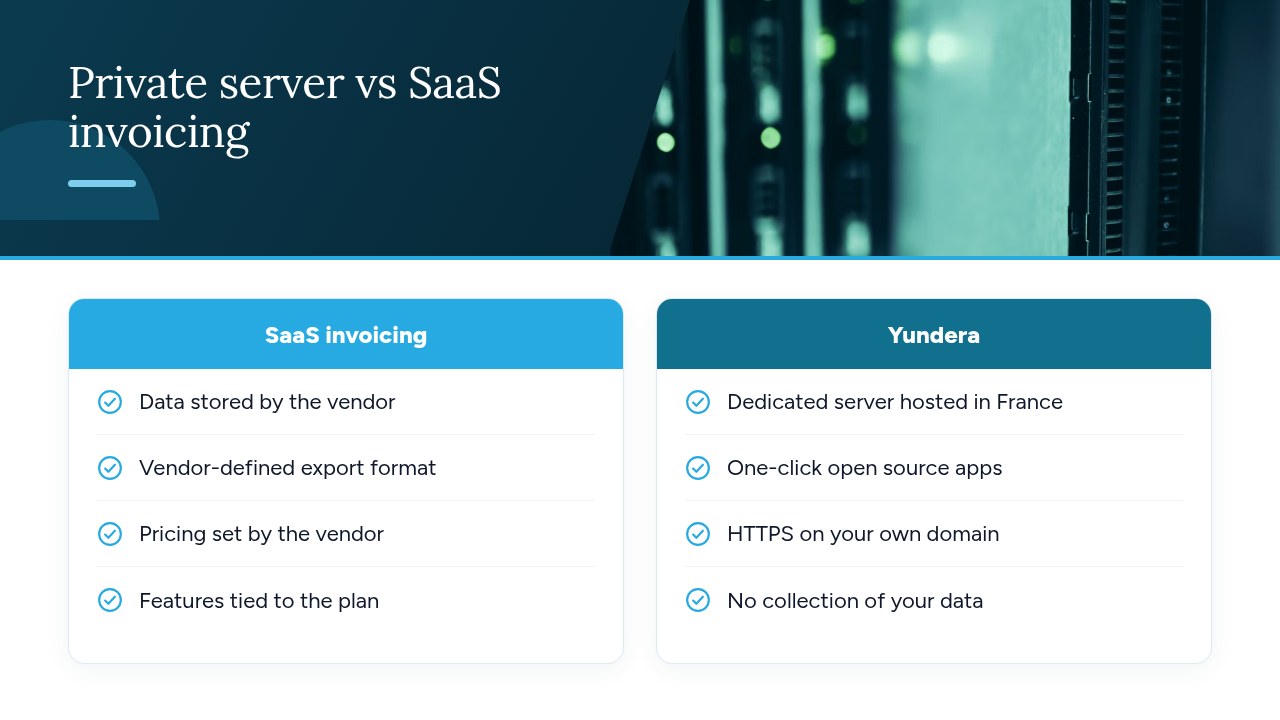
- SaaS: opening an account is all it takes, and the vendor handles updates and hosting. On the other hand, your invoices and customer file stay with them, and both export options and pricing changes depend on their decisions.
- Self-hosted open source: a tool like Dolibarr, an open source ERP and CRM, leaves you in control of your data, templates and export formats. On the other hand, updates, backups and module maintenance are your responsibility.
Four criteria help you decide:
- Invoice volume: with just a few invoices a month, simplicity comes first. Beyond that, data control and the absence of per-user costs carry more weight.
- In-house skills: can someone handle an update, a backup and a restore?
- Reversibility: will you be able to retrieve ten years of invoices in a readable format if you switch tools?
- Connection to an approved platform: can the software communicate with a platform on the official list?
Pro tip: whichever model you choose, request a full export of your invoices in the first week. If that export is hard to get at the start, it won't be any easier when you want to leave.
Yundera: a private server to host your business tools
Yundera is a practical option for hosting your open source business tools without administering a server yourself. The offer is built on a managed private server, the Personal Cloud Server, hosted in France and dedicated to a single customer. You don't need any technical skills: Yundera manages the server for you. Ready-to-use open source apps, such as file storage, photos, website hosting or office tools, install in one click from an app store. Each app is accessible over HTTPS on your own domain, with no static IP, no port forwarding and no certificates to configure. Your data stays on your server: Yundera doesn't collect it or sell it.
To be clear: Yundera is not an approved platform. For e-invoicing, your software must still be connected to one of the platforms registered by the authorities. A private server answers a different question: where your business tools and documents live, and who has access to them. For example, your documents can stay on a dedicated server alongside your other digitized files, as described in our guide to digitizing and archiving documents with an open source DMS.
For plans and pricing, see the Yundera private servers page.
E-invoicing and open source: the most common mistakes
The most common mistake is believing that self-hosted open source software exempts you from using an approved platform. It doesn't: only an approved platform provides all the functions of the reform. Other mistakes come up often: forgetting that receiving has been mandatory since September 2026, even for a micro-business; putting the Dolibarr module, still experimental, into production without testing it; choosing Factur-X when the wiki recommends CII; overlooking the new mandatory information such as the customer's SIREN number or the nature of the transactions; and finally, keeping invoices for only 6 years, or without backups, when the accounting retention period is 10 years.
To see where you stand, go through this checklist:
- Platform: a signed contract with a platform that appears on the official list.
- Software: Dolibarr 24 or later, the EInvoicing module tested and the CII format selected.
- Invoices: customer SIREN numbers filled in and invoice templates up to date.
- Archives: 10-year retention and tested 3-2-1 backups.
— Yundera
Sources
- E-invoicing and approved platforms | impots.gouv.fr
- E-invoicing: publication of the list of approved platforms | impots.gouv.fr
- Mandatory information on an invoice | Entreprendre.Service-Public
- How long must businesses keep their documents? | Entreprendre.Service-Public
- Module EInvoicing (Generic, FR, ...) - Dolibarr ERP CRM Wiki
- Dolibarr Open Source ERP and CRM - Web suite for business
Frequently Asked Questions
Does a sole trader (auto-entrepreneur) have to receive electronic invoices from September 2026?
Yes. Since September 1, 2026, all VAT-registered businesses must be able to receive electronic invoices through an approved platform, whatever their size, micro-businesses included. The obligation to issue only applies to SMEs and micro-businesses from September 1, 2027.
Can you use Dolibarr for free for e-invoicing?
Dolibarr is open source software you can install without paying for a license, and its EInvoicing module is also open source. You do, however, need a contract with an approved platform, such as SuperPDP or EsaLink, whose terms depend on the provider. Also budget for hosting costs and maintenance time.
What's the difference between an approved platform and invoicing software?
Invoicing software creates quotes and invoices and manages your customers: it's a “compatible solution”. An approved platform is registered by the authorities for a renewable three-year term. Only the platform provides all the functions required by the reform: exchanging invoices and transmitting data to the tax authority.
Factur-X, CII or UBL: which e-invoice format should you choose?
The choice mainly depends on what your software and your platform support, since the platform can convert the invoice into a format that suits your customer. With Dolibarr, the official wiki strongly recommends CII, available from version 18. Factur-X requires Dolibarr 24 or later, and UBL isn't supported yet.
How long must you keep an electronic invoice?
Customer and supplier invoices are accounting records that must be kept for 10 years from the end of the financial year, under Article L123-22 of the French Commercial Code. The tax audit period is 6 years, rising to 10 years in the case of concealed activity (Entreprendre.Service-Public). So keep them for 10 years, with regular backups.
Open Source Invoicing Software and E-Invoicing in 2026